- Free Business Listing Upload Form Instructions - Buying Video Code Instructions (go to "Upgrade Options" below)
Thanks for sharing your community! If you need further assistance, call 866-631-0411 ext. 112 weekdays 8am-5pm mountain time.
What You'll Need
1. A picture
2. Pre-determined 250 character (about 40 words) business description or blog text
3. If you choose the ad Upgrade Option, you'll also
need:
- Video (cell phone, amateur camcorder & HD, or edited commercial video).
Formats: 3GP/3G2, AVI, MP4, WMV, MPG, MOV, DivX, XviD, FLV)
- Adobe PDF file for consumer downloads such as a flyer, brochure,
or coupons. If you make this in MS Word we offer a service that can
convert it to Adobe PDF.
Free Listing or Upgrade
Seeingit.com offers free Basic Business Listings. Complete Steps 1 & 2 then click the Submit button. With our free listings, login anytime to change out the still JPEG picture. Or, in your marketing campaign, would it serve your advantage to have the ability to change out textual content, downloadable promotions or brochures, video to put a personality behind the business and keep fresh with updates, specials, new products or instructions? For our dynamic business listings, click to see "Upgrade Options" below.
We also provide a free Social and Business networking area with Video Blogs. These postings will default to our On Air category, so for Social networking and Video blogs, begin by selecting On Air business Category, then select a proper Subcategory that best describes your topic. Click to see "Social Networking & Video Blogs" below.
Step 1 Form Instructions, The Top Two Drop Down Boxes
| Figure 1: Top field box with right arrow drop down options |
![]() |
| 1. Select your business category from the drop down arrow on the right. These are the categories represented on the top of the Seeingit.com web pages. |
| Figure 2: Lower field box with right arrow drop down options |
![]() |
| 2. Select your business subcategory from the drop down arrow on the right for proper placement. If you require a more suitable Category email us. |
Step 2 Form Instructions, The Data Field Boxes
| Figure 3: Data fields with *Required actions |
![]() |
|
* Required fields 1. Business name and contact information fields - Use your physical address and not a post box or mail drop location. If you have a unit or suite number, put this in the Suite # field. 2. Email and Password fields - Remember, these will be used for the Login to make future changes. 3. Website URL http:// field - If you have a website, enter this here for 2 links on your listing (the picture and business name). Place a www. in front of your website url. 4. Upload jpeg Photo field - Locate a jpeg photo file from your hard drive by clicking on the "Browse" button. Our program will reduce its size to fit your ad but for the clearest image, you can reduce the size of the photo to around 100 x 100 pixels using photo editing software such as Microsoft Office Picture Manager. 5. Description field - Limit your description to no more than 250 characters including spaces and punctuation. You may use a document editor such as Microsoft Word, click on Tools, then select word count to see how many characters and spaces are in your description. 6. Review your listing and check the required input fields, make sure address suite #'s are in the correct box, the picture you are uploading is a JPEG file, and that you are satisfied with your description up to 250 characters, about 40 words (check with MS Word > Tools > Word count > Characters with spaces. 7. End. For free listings click the "Submit Business Listing" button. |
![]()
Social Networking and Video Blogs
For Social and Business networking, our On Air category provides a free location to post video and sill photos. Complete Steps 1 & 2, then Step 3 click free video. Select the edited length of the video - 30, 60 or 180 seconds; browse for the file, then click the Submit button. This form and upload procedure is Smartphone friendly and can be managed by a cell phone. Uploading cell phone video is limited to 30 seconds due to their network speed limitations.
Step 3 Form Instructions, Dynamic Listings and Upgrade Options
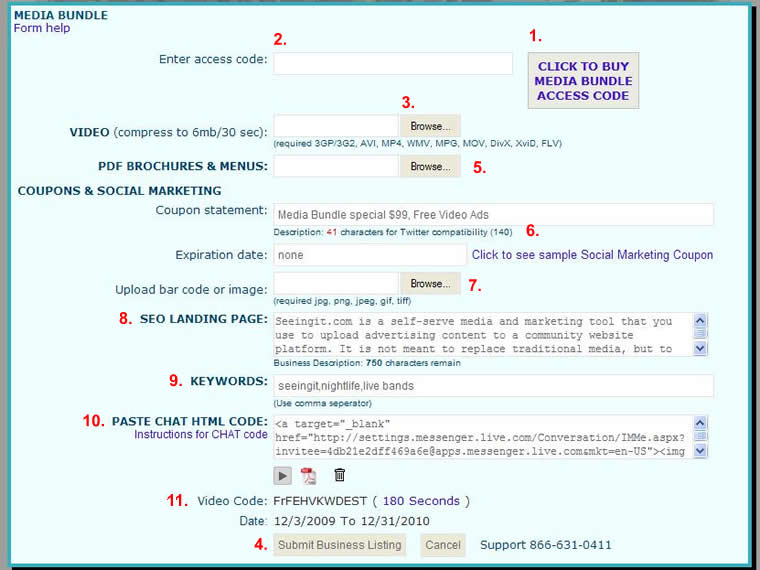
| Figure 4: Required actions to purchase Video code |
![]() |
Buy a Code Instructions - Step 3
1. Click on the Commercial Video Balloon.
2. Click on the "Buy air time here" link to the right.
Step 3 is also the location where you return to upload new video, picture, Adobe PDF files and Textual Content.
| Figure 5: Secure Online Store for Purchasing Video Code |
![]() |
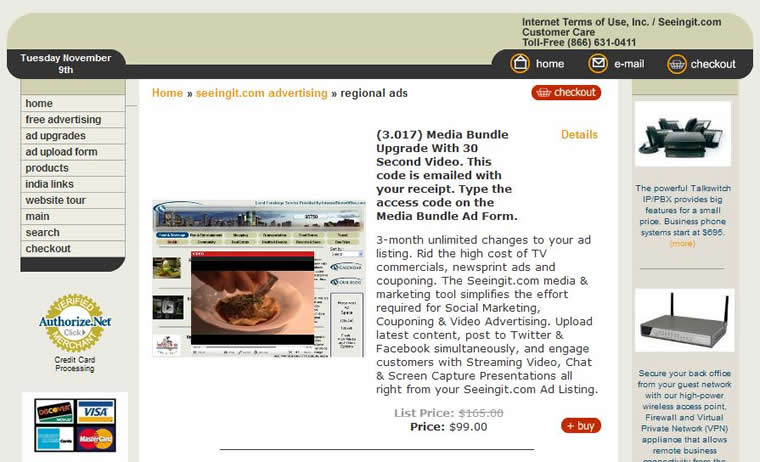
3. Choose your desired product, based on the your desired Video time in your listing presentations, 30 seconds, 60 seconds, or 180 seconds and click on the Buy button.
|
|
|
| Figure 6: Secure Online Store for Purchasing Video Code | |
![]() |
|
|
4. If your order looks correct, click on the
Checkout button and complete the secure online purchase form and
transaction. This process generates a video Code that allows you to
complete your Dynamic Business Listing and return as often as needed to
update your ad.. 5. A receipt and Video code confirmation will be emailed to the email account that was entered. 6. Enter the Video code provided in the "Enter video code" field (Figure 4); browse for a video file and an Adobe PDF file, then click on the "Submit Business Listing" button. The listing Upgrade Option can be performed in two-steps; 1) Post a free basic business listing; 2) Purchase a Video code and return to add your Video and Adobe PDF files anytime. |
|
All Upgrade Options
#1. Video commercials - Purchase a Code for 30 or 60 seconds, or 3 minutes of air time. Upload new video as many times as you like. Or, choose our professional services to produce a commercial for you, that you own and can also use for network television. Click on Commercial Video, then click on the "Buy air time here" link to the right and get the code. If you intend to produce your own video commercial or upload unedited cell phone video on a regular basis, we provide a discounted rate since we are not having to create a professional commercial production. Use the discount code explained in the product description in the Store to reduce the purchase price.
#2. Slide show - Up to 6 images on your business
listing that rotate as a slide show.
Click on the Slide Show Option, then click on the "Buy Slide Show code" link to
the right to get your code and proceed to browse for your photos which we will
convert to a slide show.
#3. Storefront Power Seller - Contact us at 866-631-0411 ext. 112 M-F 8am-5pm mountain time for assistance with getting products uploaded. Sale proceeds are deposited directly to your bank electronically.
#4. Top of the Town, top 10 business listing - After you have successfully uploaded your listing, contact us at 866-631-0411 ext. 112 M-F 8am-5pm mountain time and we will make website changes to have your listing in the top 10 spots.
Upgrades Include:
A static picture image; a 250 character (about 40 words) business
description; phone number and links to your website.
Editable Description - Yes.
Editable Picture - Yes.
Editable Video - Yes.
Editable PDF Brochure - Yes.
Video Blog Tips Business & Social
We are a community website and stress that video and subject matter be free of sexual and offensive content. Videos are subject to review by editors before being posted. For our free On Air category, for you'll want to create a theme for your posts. Name your theme in the "Company or Vlog title" form field.
Video blog for businesses -
Make a commercial; keep it fresh with updates, specials, new products or
instructions. Professional production available.
Video blog for journalists - Free. Post interviews, community events, outdoor,
and special interest subject matter.
Video blog for social & family - Free. Keep in touch with a family or social
network. Keep your postings fresh with new video and description content.
Video blog for video artists - Free. Create a video segment in 30 or 60 seconds,
or up to 3 minutes to showcase your band or artistic creativity.
Video blog for instruction or teachers - Free. Post activity and event
information, assignments or how-to instructions.
Error & Troubleshooting Assistance
Description is too long. 250 characters or about 40 words are allowed The Website URL field, begin website with www Upload photo - use .jpg file format Complete the “required” contact fields Refresh the page, and re-post
If further assistance is required, or if you have any questions, please contact us at 866-631-0411 ext. 112 M-F 8am-5pm mountain time or email us.
Disclaimer
Seeingit.com reserves the right to deny listings due to content or for any other reason. Seeingit.com at its discretion retains the right to charge advertisers a monthly fee due to the type of product a business lists; the sales value; the bandwidth consumed by the type of ad; and value to the business for using the intellectual property and patent pending business-methods owned by Internet Terms of Use, Inc. DBA Seeingit.com.
Prior to posting video, be aware of potential copyright infringement such as using background music that you don't own or have the rights to. With participating subjects, incidental appearances, peoples names used, a signed "appearance release" can help avoid legal issues. Also, be concerned for a getting release to shoot video in a commercial establishment and provide location and talent credits. For best protection, consult an attorney.
![]()
To contact us call toll free 866-631-0411, or
Email
Copyright © 2006-2009 Internet Terms of Use, Inc. All rights
reserved. Patent pending
Refund Policy
Privacy Policy
Careers